So I am about to install SharePoint Server 2010 Beta on a fresh Windows 7 install. I am planning on continually updating this post with my progress. So here goes nothing.
Step 1: Find out what others are saying
http://msdn.microsoft.com/en-us/library/ee554869%28office.14%29.aspx
Step 2: Reinstall the correct version of Windows 7
Before getting started or reading any guides, I installed Windows 7 Ultimate N, which I now know the Beta only works on non-N versions of Windows 7. So far off to a great start 
Step 3: Install a butt-load of prereqs
Stuck to the MSDN guide and all went well.
Step 4: Install SharePoint Server 2007
Make sure to run the setup.exe in the extracted folder created by following the MSDN guide above, not the downloaded .exe.
Step 5: Configure the SharePoint Farm
I received the following error:
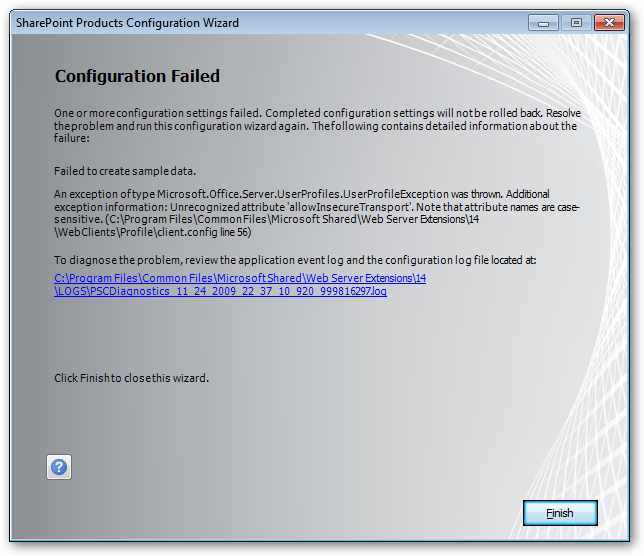
Installing the following KB update corrected this problem:
Step 3: Install a butt-load of prereqs
Stuck to the MSDN guide and all went well.
Step 4: Install SharePoint Server 2007
Make sure to run the setup.exe in the extracted folder created by following the MSDN guide above, not the downloaded .exe.
Step 5: Configure the SharePoint Farm
I received the following error:
Installing the following KB update corrected this problem:
http://connect.microsoft.com/VisualStudio/Downloads/DownloadDetails.aspx?DownloadID=23806
Step 6: Tune SharePoint and SQL Server
I could use some recommendations for this step. After completing the installation and creating my first Site Collection, there appears to be 4 IIS Worker Processes and 7 or more Windows Services running related to SharePoint. I will be experimenting with timeout settings for the applicatio