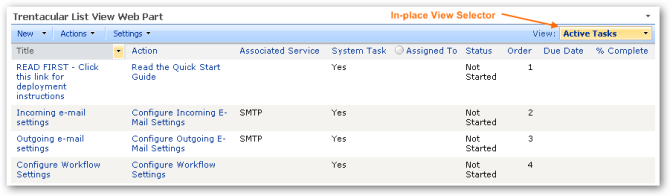
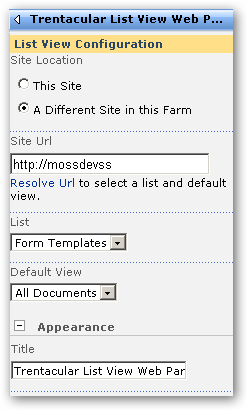
I just published an enhanced List View Web Part in the Trentacular SharePoint 2007 Features CodePlex project. The Web Part is a substitute for the out of the box List View Web Part with two additional capabilities:
- Toggling of views in place (without leaving the web part page)
- Ability to display lists located in different sites of the same SharePoint Farm
Development of this Web Part has proved to be a very difficult undertaking, cialis and I would love for any assistance or ideas with how to go about accomplishing this differently.
Here is where I’ve currently landed in the Web Part’s development:
- I am accessing the SPLimitedWebPartManager at the selected view’s url to load the SharePoint List View Web Part that was provisioned for the view when created
- I then use reflection to invoke the private RenderView method of the Web Part
Yes, see this sounds extremely hacky, pilule and it is. Using the avaliable SharePoint ListView control didn’t play nice with many custom views (especially when the list used managed content types). I’ve also tried the SPView.RenderAsHtml method, but this also presented problems.
Another possible option would be to use the ListViewByQuery WebControl, but this would require an intense amount of code to duplicate the sorting and filtering that is available through the ListView control. So if you think this Web Part would be useful and would like to contribute to furthering it along, please get in touch.
Here are some screenshots:
Hello!
I have an exception when trying to open Actions menu: “An error has occurred with the data fetch. Please refresh the page and retry.”
Refreshing the page doesn’t help.
Thank you,
Aviw
@Aviw
Good find. It seems this occurs when referencing a list that is not local to the current web site. I am thinking of removing the toolbar for “remote” lists to prevent this error.
Here are a few more issues I’ve discovered with this WebPart thus far that need addressing:
- Folder links navigate to the list view page instead of staying on the current WebPart page
- Multiple occurrences of this web part on the same WebPart page cause the EditControlBlock (ECB) links to be incorrect
All in all, I must admit this WebPart is not yet ready for prime time. Stay tuned for updates though.
I’ve got good news and bad news …
Good News
I just released a new version of this Web Part that fixes the above mentioned issues.
Bad News
I have a single report that the Web Part is failing on WSS SP2. Has anyone else seen this issue? It would be nice to have at least one more report that there is indeed a problem before I apply SP2 and attempt to reproduce. Anyone else?
Hi Trent,
Sorry for hijacking this post but are you able to expand on the “An error has occurred with the data fetch” problem described above? I’ve come across the message in an entirely different context but I’m not clear what causes it. You mention access to a list not local to the site-any more info?
Cheers,
Michael
Hi,
I need assistance on customizing the ListViewWebPart for on my requirment. The SP form library column as a concatenated text string (one, two, three) and I need to create a web part which categorizes based on the one, two, three values having same item row (documents) in in different groups.
For Example:
If one user has access to one, two, Three, Four, Five
And another has access to One, two, Three
They have to have the ability to choose an Area like “one” and see all users that have that access, so both users would show in the list. But if Five was selected only the first user would show.
Any help is appreciated. Thanks
Well, I did something similar to this quite easily.
You can use SPView’s RenderAsHtml method and spit it out in RenderContents method:
protected override void RenderContents(HtmlTextWriter writer)
{
base.RenderContents(writer);
try
{
//use your code to get the list by given url
SPList list = MyHelper.GetListByUrl(YOUR LIST URL);
//get selected view (for simplicity you could leave DefaultView)
SPView vw = list.DefaultView;
foreach (SPView v in list.Views)
{
if (v.ToString() == “YOUR VIEW”)
{
vw = v;
}
}
string viewHtml = vw.RenderAsHtml();
writer.Write(viewHtml);
}
catch (Exception e)
{
writer.Write(“Error message: ” + e.Message);
}
}
Hi,
Know your are an sharepoint expert.
Looking for a list view that can display 9 items from a list in 3×3=9 cells.
cannot find it on the web. or is it easy to create one ourselves? Please help.
Thank you
martin